Help centre / Planning work
The timeline, baselines and changes
Show stakeholders the plan, compare it with what was promised, and explain what moved.
The timeline is the plan as stakeholders see it. It shows epics and initiatives, never individual stories, and every date on it comes from the work itself.
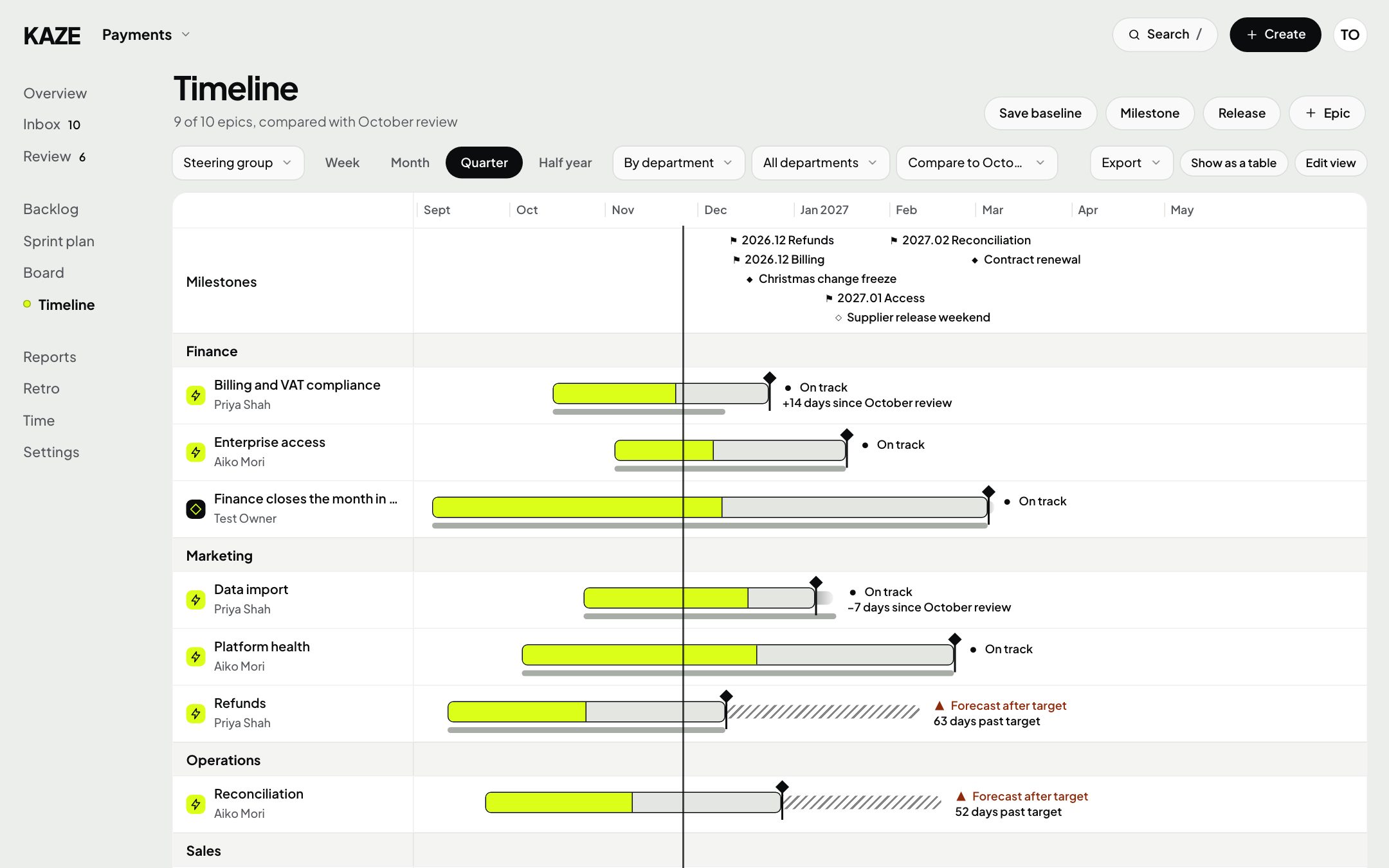
Before an epic appears
An epic appears once it has an outcome (one plain sentence about what changes for people) and a sponsor. Epics missing either are listed under Not shown yet, with what they need.
Targets and forecasts
The diamond is the target date. The striped range is the forecast, worked out from the team's real pace over recent weeks. When the forecast runs past the target, the epic is marked as forecast after target.
Baselines
Choose Save baseline before a review. From then on, Compare to shows the saved plan as a grey line under each bar, and What changed lists what was delivered, slipped, moved earlier, added, removed or displaced. A baseline cannot be edited.
Reasons for change
Once a date is in a baseline, changing it asks why. The reason is recorded in the history and shown on the timeline.
Sharing
Save a view to keep its zoom, grouping and comparison. You can share a view with named people in your organisation, who see only that view. Export any view as PowerPoint or PDF on Pro and above.