Help centre / Planning work
Planning a sprint
Create sprints, use suggestions, set capacity and complete a sprint.
The sprint plan
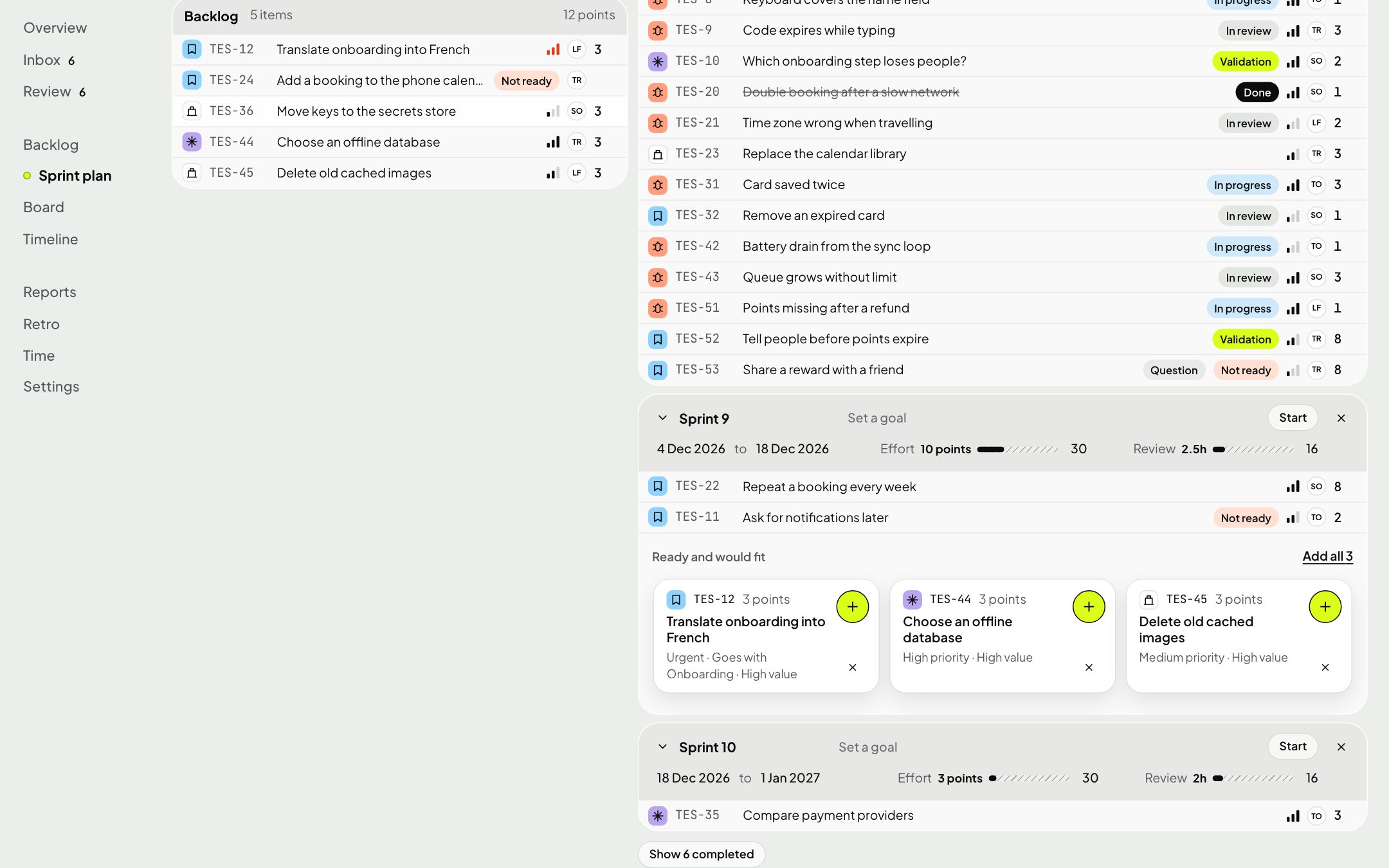
Sprint plan shows the backlog on the left and your sprints on the right. Drag ready items into a sprint, or open an item and choose its sprint.
Suggestions
Each planned sprint shows ready items that would fit the room left, with a + to add them. Every suggestion says why it is there: due in this sprint, matches the goal, unblocks other work, finishes an epic, priority. Blocked items, items with open questions and items that are not ready are never suggested. Choose Hold still if you prefer the cards not to move.
Capacity
Set the effort the team can take, and the review hours available. Agents write faster than people can review, so plan the review time too. The sprint plan shows the team's recent average as a guide.
Completing a sprint
Choose Complete on the active sprint, record whether the goal was met, and decide where unfinished work goes. The result feeds the sprint reports.